- 1. Why agents need a different kind of monitoring
- 2. The architecture
- 3. The agent under observation
- 4. Instrumenting the agent
- 5. What we collect
- 6. The evaluation layer
- 7. The Collector does the heavy lifting
- 8. The dashboard
- 9. Six failures, and the signal that catches each
- 10. Deploying the dashboard securely for clients
- 11. Scaling up: from one agent to many
- 12. Try it
- Closing
TL;DR. AI agents fail in ways that never trigger an alert: a tool errors and the model works around it, the agent loops, a dependency slows down, or the model confidently contradicts the data it just read. This article walks through an open-source reference implementation that makes those failures visible. A LangChain agent is instrumented with OpenTelemetry; an OpenTelemetry Collector redacts PII, derives metrics from traces and routes everything to Prometheus, Tempo and Loki; and Grafana shows it all on one dashboard. On top of that sits an online evaluation layer that scores every answer, because a perfectly healthy trace can still carry a wrong answer. Finally, I show how to deploy the dashboard securely so clients can log in, and how the same design scales from one agent to many.
Code: github.com/mohcinemadkour/agent-observability-demo.
docker compose upand you have the whole thing running locally, offline, in about five minutes.
1. Why agents need a different kind of monitoring
A classic web service fails loudly. It throws an exception, returns an HTTP 500 or times out, and an alert fires. Monitoring the “four golden signals” (traffic, errors, latency, saturation) catches most problems.
An AI agent fails quietly. Here are five failures I see repeatedly, none of which necessarily produces an error code:
- A tool fails and the model papers over it. The sensor API returns a 503; the model apologizes, or worse, guesses.
- The agent loops. A tool says “incomplete, please retry”, and the model obediently retries forever, burning tokens.
- A dependency gets slow. Nothing errors, but answers take ten seconds instead of two.
- The answer is wrong. The model read a critical vibration reading and replied “looks fine, no action needed”. Every span is green.
- Sensitive data leaks. A user pastes an email and phone number, and they end up in your logs and your trace backend.
The first three are operational problems that good telemetry can surface. The fourth and fifth are quality and safety problems that telemetry alone cannot judge. You need both, on the same pipeline, so you can see them side by side. That is the core idea of this article:
Observability tells you what the agent did. Evaluation tells you whether it was right.
2. The architecture
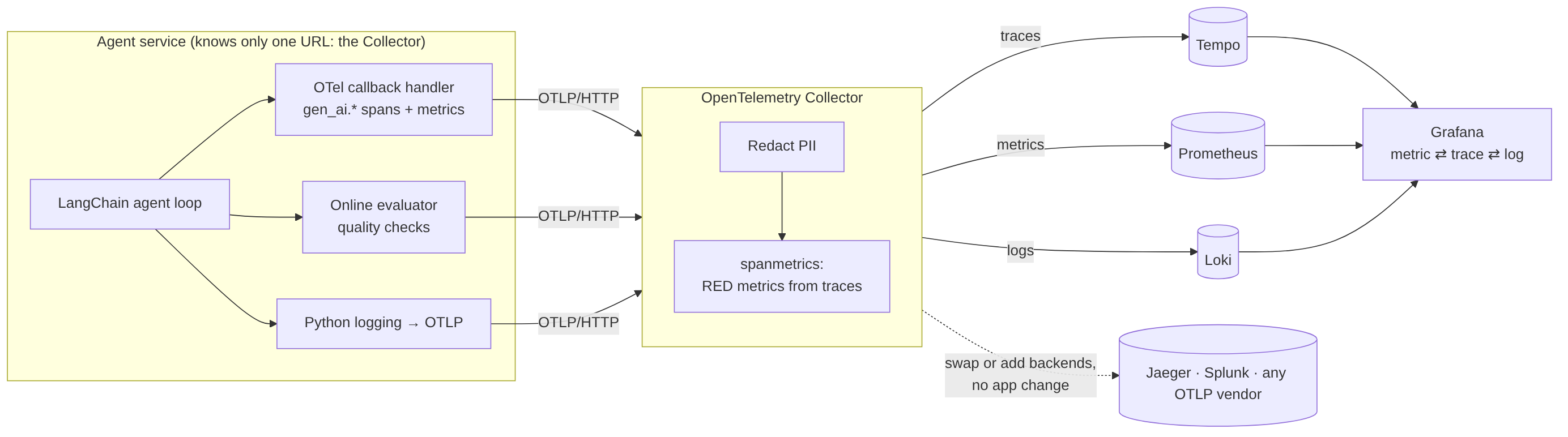
Every component is open source and vendor-neutral:
| Component | Role | Why this one |
|---|---|---|
| OpenTelemetry SDK (Python) | Produces traces, metrics and logs inside the agent | The industry standard; every backend accepts it |
| OpenTelemetry Collector | Receives, transforms and routes telemetry | Keeps backends, redaction and routing out of application code |
| Prometheus | Stores metrics | De facto standard for time-series metrics and alerting |
| Grafana Tempo | Stores traces | Cheap, object-storage-friendly, queried with TraceQL |
| Grafana Loki | Stores logs | Label-indexed logs with trace IDs kept as metadata |
| Grafana | Dashboards and drill-down | One pane of glass across all three, with click-through links |
The single most important design decision: the agent knows exactly one thing about observability, the Collector’s address (OTEL_EXPORTER_OTLP_ENDPOINT). Which backends receive the data, what gets redacted, and which metrics get derived is decided in the Collector. Changing from Tempo to Splunk, Datadog or Honeycomb is a Collector configuration change, not a code change.
3. The agent under observation
To keep the focus on observability, the agent is deliberately simple but realistic: a single tool-calling agent for predictive maintenance in a machining plant. Given a question like “The spindle on CNC-07 sounds rough, check it and open a service order if needed”, it loops:
- Call the LLM with the conversation and the available tools.
- If the LLM requests a tool, run it and append the result.
- Stop when the LLM gives a final answer, when the loop guard trips (same tool, same arguments, more than three times), or after ten iterations.
- Run the online evaluator on the answer and the tool results.
It has four tools: get_asset_info, get_sensor_readings, search_maintenance_manual and create_service_order. Faults can be injected into them on demand (more in section 9).
By default it runs on a deterministic, offline mock LLM that behaves exactly like a real LangChain chat model (tool calls, token usage, finish reasons), so demos don’t depend on conference Wi-Fi. One environment variable switches to OpenAI or Anthropic.
4. Instrumenting the agent
4.1 Bootstrapping OpenTelemetry
Three providers, three OTLP exporters, one endpoint. Everything else is defaults.
resource = Resource.create({"service.name": "maintenance-agent",
                            "deployment.environment.name": "production"})

tp = TracerProvider(resource=resource)
tp.add_span_processor(BatchSpanProcessor(OTLPSpanExporter()))
trace.set_tracer_provider(tp)

reader = PeriodicExportingMetricReader(OTLPMetricExporter(), export_interval_millis=5000)
metrics.set_meter_provider(MeterProvider(resource=resource, metric_readers=[reader]))

lp = LoggerProvider(resource=resource)
lp.add_log_record_processor(BatchLogRecordProcessor(OTLPLogExporter()))
logging.getLogger("agent").addHandler(LoggingHandler(logger_provider=lp))
A subtle detail: the logging handler is attached to the application’s agent logger, not the root logger. Attaching it to the root logger also captures the OpenTelemetry SDK’s own internal logs, which can deadlock the exporters at shutdown.
4.2 A LangChain callback handler that speaks OpenTelemetry
LangChain fires callbacks at every LLM and tool boundary. A ~150-line handler turns them into spans and metrics that follow the OpenTelemetry GenAI semantic conventions, the emerging standard names for LLM telemetry (gen_ai.request.model, gen_ai.usage.input_tokens, gen_ai.tool.name and so on):
class OTelCallbackHandler(BaseCallbackHandler):
    def on_chat_model_start(self, serialized, messages, *, run_id, parent_run_id=None, metadata=None, **kw):
        span = tracer.start_span(f"chat {model}", kind=SpanKind.CLIENT,
                                 context=self._parent_ctx(parent_run_id),
                                 attributes={"gen_ai.operation.name": "chat",
                                             "gen_ai.provider.name": provider,
                                             "gen_ai.request.model": model})
        ...

    def on_llm_end(self, response, *, run_id, **kw):
        usage = response.generations[0][0].message.usage_metadata
        span.set_attribute("gen_ai.usage.input_tokens", usage["input_tokens"])
        token_usage.record(usage["input_tokens"], {"gen_ai.token.type": "input", ...})
        ...

    def on_tool_error(self, error, *, run_id, **kw):
        span.record_exception(error)
        span.set_status(Status(StatusCode.ERROR, str(error)))
        tool_calls.add(1, {"gen_ai.tool.name": name, "status": "error"})
Use it on any runnable: model.invoke(messages, config={"callbacks": [OTelCallbackHandler()]}).
I wrote it by hand so the audience can see exactly what “instrumenting an agent” means. In production you can use a ready-made instrumentation library such as OpenLLMetry or OpenInference instead; they emit similar gen_ai.* attributes, and the Collector and dashboards don’t care which one produced them.
4.3 The agent span
The whole run is wrapped in one parent span, invoke_agent maintenance-agent, carrying the summary: input, output, iteration count, tool call count, outcome (success, tool_error, loop_detected, llm_error, max_iterations) and, after evaluation, the quality score. Loops are recorded as a span event, agent.loop_detected, because a loop is not an exception: you have to define it and emit it yourself.
5. What we collect
5.1 Metrics
All metrics land in Prometheus. OpenTelemetry names use dots; Prometheus converts them to underscores and adds unit and type suffixes (agent.run.duration in seconds becomes agent_run_duration_seconds).
Agent level (emitted once per run)
| Metric | Type | Labels | What it tells you |
|---|---|---|---|
agent_runs_total | counter | outcome | Throughput and run success rate |
agent_run_duration_seconds | histogram | outcome | End-to-end latency; p95 is the slow tail users feel |
agent_iterations | histogram | Reasoning steps per run; a rising count is the early warning of a loop | |
agent_loop_detected_total | counter | Runs stopped by the loop guard |
Tools
| Metric | Type | Labels | What it tells you |
|---|---|---|---|
agent_tool_calls_total | counter | tool, status, error type | Per-tool error rate: which dependency is failing |
agent_tool_duration_seconds | histogram | tool, status | Which dependency is slow |
LLM (GenAI semantic conventions)
| Metric | Type | Labels | What it tells you |
|---|---|---|---|
gen_ai_client_token_usage | histogram | token type, model, provider | Tokens per call; the basis of cost tracking |
gen_ai_client_operation_duration_seconds | histogram | model, provider | Model latency, separated from tool latency |
Evaluation
| Metric | Type | Labels | What it tells you |
|---|---|---|---|
agent_evaluations_total | counter | verdict | Evaluation pass rate: the quality counterpart of run success |
agent_eval_check_failures_total | counter | check | Why quality dropped |
agent_eval_score | histogram | Fraction of checks passed per run |
Derived by the Collector from traces (no code in the agent)
| Metric | Type | What it tells you |
|---|---|---|
traces_span_metrics_calls_total | counter | Rate and errors for every span: each LLM call, tool and evaluation |
traces_span_metrics_duration_milliseconds | histogram | Latency per step, with exemplars linking a point on the graph to a real trace |
5.2 Traces
One trace per run:
invoke_agent maintenance-agent        outcome, iterations, eval.score, eval.passed
├─ chat gpt-4o-mini                   model, input/output tokens, finish reason, tool calls chosen
├─ execute_tool get_asset_info        tool name, call id, arguments, result
├─ chat gpt-4o-mini
├─ execute_tool get_sensor_readings   ← status ERROR + exception event when it fails
├─ …
└─ evaluate maintenance-agent         one gen_ai.evaluation.result event per check
Prompt and completion capture is controlled by one variable, OTEL_INSTRUMENTATION_GENAI_CAPTURE_MESSAGE_CONTENT. Turn it off when handling real client data.
5.3 Logs
Ordinary Python logging, bridged to OTLP. Because records are written while a span is active, each carries that span’s trace_id and span_id automatically. That is what makes the three signals click together in Grafana: from a latency spike (metric) to the slow trace (exemplar) to the error message (log) in three clicks.
6. The evaluation layer
After every run, five fast, deterministic checks score the answer:
| Check | Passes when | Catches |
|---|---|---|
task_completed | The run finished successfully | Tool errors, loops, crashes |
grounded_in_evidence | At high or critical severity, the answer reflects the sensor data and contains no dismissive language | Confident answers that contradict the data |
required_action_taken | At high or critical severity, a service order was opened | Noticing a problem but not acting |
no_pii_in_output | No email or phone number in the answer | Echoing personal data |
tool_call_budget | Six tool calls or fewer | Runaway or inefficient runs |
Each result becomes a gen_ai.evaluation.result span event on the trace it judges, summary attributes on the agent span, and Prometheus metrics. Quality now lives on the same dashboard as latency and errors, and you can query for “runs that succeeded technically but failed evaluation”:
{ name = "invoke_agent maintenance-agent" && (status = error || span.eval.passed = false) }
These checks are deliberately cheap and rule-based so they can run on every request. The same event format carries scores from an LLM-as-judge or a human reviewer; a common pattern is cheap checks on 100% of traffic and expensive judges on a sample.
7. The Collector does the heavy lifting
Three Collector features earn their place in any AI deployment.
PII redaction, centrally. One processor scrubs emails and phone numbers from every span attribute and log body before anything reaches a backend. No application changes, and it protects every service behind the Collector:
transform/redact:
  trace_statements:
    - context: span
      statements:
        - replace_all_patterns(attributes, "value", "[A-Za-z0-9._%+-]+@[A-Za-z0-9.-]+\\.[A-Za-z]{2,}", "<redacted:email>")
Metrics from traces. The spanmetrics connector turns every span into rate, error and duration metrics, split by span name, model and tool. You get RED metrics for every step of the agent without writing a metric.
Vendor neutrality. Backends are additional config files merged at startup. Adding Jaeger alongside Tempo, or sending a copy of traces to a commercial vendor, means restarting only the Collector:
exporters:
  otlp/jaeger: { endpoint: jaeger:4317, tls: { insecure: true } }
service:
  pipelines:
    traces:
      exporters: [otlp/tempo, spanmetrics, otlp/jaeger]
8. The dashboard
The Grafana dashboard is generated from code and organized in six rows, each answering one question:
- Is it up? Runs per minute, run success rate, evaluation pass rate, p95 latency, loops detected, tokens per minute.
- Green is not the same as correct. Run success rate and evaluation pass rate on one graph. The gap between the two lines is your blind spot: runs that looked healthy to tracing but gave a wrong or unsafe answer. Next to it, a ranking of which evaluation checks fail most.
- What is failing? Runs by outcome and error rate per tool.
- Where does the time go? p95 latency per step (click an exemplar to open the slow trace) and reasoning iterations per run.
- LLM cost and latency. Tokens per minute by model and type; model latency p50 and p95.
- Drill down. A table of failed or wrong runs (TraceQL) and the live log stream.
9. Six failures, and the signal that catches each
| Scenario | What breaks | How you see it |
|---|---|---|
| Healthy | Nothing | Baseline everywhere |
| Tool failure | Sensor gateway returns HTTP 503 | Red tool span with stack trace, linked error log, tool error-rate panel |
| Slow dependency | Manual search takes 4 s | p95 per step spikes; an exemplar opens the slow span |
| Loop | Tool keeps saying “retry” | Loop counter, iterations panel, agent.loop_detected event, token spike |
| Silent wrong answer | Agent says “looks fine” despite critical readings | Only the evaluation sees it: the gap panel, failed-checks ranking, failed-runs table |
| PII | User pastes an email and phone | Values redacted in traces and logs; no_pii_in_output fails |
The fifth row is the point of the whole exercise. Every span is green, the run “succeeded”, and a spindle bearing is about to fail with no work order opened. If you only watch error rates, you ship wrong answers with a 100% success rate.
10. Deploying the dashboard securely for clients
A dashboard on localhost convinces nobody. The repository includes a production overlay that puts the stack on any Linux server with HTTPS and proper access control, while exposing almost nothing.
            Internet (HTTPS only)
                    │
             ┌──────┴──────┐   automatic Let's Encrypt certificates
             │    Caddy    │   security headers
             └──┬───┬───┬──┘
   dashboard ───┘   │   └─── otlp  (bearer token, checked by the Collector)
   (Grafana login)  │
               demo (password-protected control panel)
   ───────── private Docker network: nothing else is reachable ─────────
What the overlay changes:
- One public entry point. Only Caddy publishes ports (80/443). Prometheus, Tempo, Loki, the Collector’s internal ports and the agent API have no public port at all. This matters because Docker can bypass host firewalls like
ufwwhen it publishes ports. - Automatic HTTPS. Caddy obtains and renews certificates as soon as DNS points at the server.
- Real logins. Grafana’s anonymous access is turned off. You keep the admin account; each client gets a read-only Viewer account (one command:
./deploy/add_client_viewer.sh "Jane Doe" jane@client.com). Viewers can browse dashboards and open traces but can’t save changes or touch data sources. - A protected control panel for triggering failure scenarios live during a client call.
- Authenticated ingest. An optional OTLP endpoint lets a client point their own agents at your stack with three environment variables; the Collector rejects anything without the bearer token.
- Persistence and retention. Data lives in named volumes; metrics retention is configurable.
Deployment is three steps once DNS is set:
cp deploy/.env.prod.example .env      # domains, admin password, token, demo password hash
./deploy/deploy.sh                    # validates, builds, starts, prints the URLs
./deploy/add_client_viewer.sh "Jane Doe" jane@client.com
The full guide, including firewall rules, a security checklist, backups and a Coolify variant, is in deploy/DEPLOY.md.
A note on client data. For a demo, the shared stack is fine. For real client workloads, give each client a separate deployment (or at least a separate Grafana organization and ingest token), turn off prompt capture, and agree on retention up front. Observability data from an AI system contains the system’s inputs and outputs; treat it with the same care as the production database.
11. Scaling up: from one agent to many
The demo is a single tool-calling agent. Real systems rarely stay that simple. The good news: the pipeline doesn’t change. The Collector, backends, redaction, derived metrics and dashboards all carry over. What changes is what you instrument and what you evaluate.
11.1 Which architecture do you have?
| Architecture | What it looks like | What to instrument |
|---|---|---|
| Single agent with tools (this demo) | One LLM in a reason-act loop | Agent span, LLM spans, tool spans, loop guard |
| Orchestrator and workers | A supervisor routes tasks to specialist agents (e.g. diagnosis, retrieval, scheduling) | One invoke_agent span per agent, nested under the orchestrator; a routing decision attribute |
| Graph workflow (e.g. LangGraph) | Nodes and edges with shared state; conditional branches and cycles | A span per node, with node name and the edge taken; state size; cycle counts |
| Handoff / peer agents | Agents pass control to each other (swarm-style) | Handoff events with source and target agent; handoff depth |
| Planner and executor | One agent plans, others execute steps | The plan as an attribute; one span per step; plan revisions as events |
| Agents as separate services | Agents talk over HTTP, queues, MCP or agent-to-agent protocols | Context propagation: pass the trace ID across every hop, or each service produces a disconnected trace |
| Retrieval-augmented agents | Any of the above plus a vector store | A retrieval span per query: collection, top-k, scores, latency |
If you don’t use LangChain or LangGraph, nothing important changes. The callback handler is one way to produce gen_ai.* spans; the alternatives are an off-the-shelf instrumentation library for your framework or SDK (OpenAI, Anthropic, Bedrock, CrewAI, LlamaIndex and others are covered by OpenLLMetry or OpenInference), or a few manual spans around your own loop:
with tracer.start_as_current_span(f"invoke_agent {agent_name}",
                                  attributes={"gen_ai.operation.name": "invoke_agent",
                                              "gen_ai.agent.name": agent_name}):
    ...
The rule is the same everywhere: one span per agent invocation, one per model call, one per tool or retrieval, consistent attribute names, and trace context propagated across every process boundary.
Context propagation across services. OpenTelemetry’s HTTP instrumentations inject and extract the W3C traceparent header automatically. For message queues, or protocols your instrumentation doesn’t cover, inject it into message headers explicitly:
from opentelemetry.propagate import inject, extract
headers = {}; inject(headers)              # producer: attach to the outgoing message
ctx = extract(message.headers)             # consumer: continue the same trace
with tracer.start_as_current_span("invoke_agent scheduler", context=ctx): ...
11.2 Additional metric groups for multi-agent systems
On top of the metrics in section 5, these are the groups I add as systems grow:
Routing and coordination
- Routing decisions per target agent, and routing accuracy (against labeled samples)
- Handoffs per run and handoff depth; ping-pong count (two agents passing the same task back and forth, the multi-agent version of a loop)
- Per-agent iteration counts and per-agent share of run latency
Retrieval (RAG)
- Retrieval latency, documents returned, top similarity score
- Empty-retrieval rate (no document above the threshold)
- Cache hit rate for embeddings and retrieval
Cost and capacity
- Tokens and cost per agent, per task type and per successful outcome (cost per resolved task is the number executives understand)
- Provider rate-limit responses (HTTP 429), retries and fallbacks to secondary models
- Queue depth and wait time when agents communicate asynchronously
Guardrails and safety
- Guardrail triggers by type: PII, prompt injection detected, policy violations, toxic content
- Human-in-the-loop: escalation rate and time waiting for human approval
Business and feedback
- Task completion rate as defined by the business (a work order opened, a ticket resolved)
- User feedback (thumbs up/down, edits to the agent’s output) attached to the trace
- Acceptance rate of agent recommendations
Drift
- Distribution of input types and lengths over time
- Evaluation scores over time per agent and per model version: the earliest signal that a model upgrade or prompt change made things worse
11.3 Evaluation metrics, by layer
I go deeper on offline evaluation, golden datasets and CI gates in Evaluating Agentic AI Systems: A Practitioner’s Guide.
The demo’s five rule-based checks are a starting point. For multi-agent and RAG systems, I organize evaluation in layers, from the component up to the business outcome:
| Layer | Metrics | Typical method |
|---|---|---|
| Retrieval | Context precision, context recall, NDCG@k, MRR@k | Labeled queries; RAGAS-style metrics |
| Generation | Faithfulness / groundedness, answer relevancy, semantic similarity to a reference | LLM-as-judge at temperature 0, embeddings |
| Tool use | Tool selection accuracy, argument correctness, unnecessary tool calls | Compare against expected tool calls |
| Trajectory | Task completion, step efficiency (steps vs. optimal), plan adherence, recovery after a tool failure | Trace-level judges over the full span tree |
| Multi-agent | Routing accuracy, handoff success, redundant work across agents, conflict between agents’ outputs | Per-agent spans + labeled routing samples |
| Safety | PII leakage, prompt-injection resistance, policy compliance, refusal correctness | Rules + classifiers + red-team sets |
| Business | Cost per resolved task, escalation rate, acceptance rate, time to resolution | Joined with business systems |
Three practices make these useful rather than decorative:
- Run them in two places. Offline in CI against a fixed test set, with thresholds that block a release (for example: faithfulness ≥ 0.70, answer relevancy ≥ 0.70, context precision ≥ 0.60, task completion ≥ 0.75). And online, on a sample of production traces, emitted as
gen_ai.evaluation.resultevents so the scores sit on the same dashboard as latency and cost. - Show the CI threshold on the production graph. When production faithfulness drifts below the line your CI enforces, you know before your users do.
- Attach scores to traces, not just to aggregates. An aggregate tells you quality dropped; the trace tells you which agent, which retrieval and which prompt caused it.
11.4 What the multi-agent trace looks like
invoke_agent orchestrator                     route=diagnosis
├─ chat claude-…                              routing decision
├─ invoke_agent diagnosis-agent
│  ├─ retrieve manuals                        collection=manuals, k=5, top_score=0.81
│  ├─ chat claude-…
│  └─ execute_tool get_sensor_readings
├─ handoff diagnosis-agent → scheduler-agent
├─ invoke_agent scheduler-agent
│  └─ execute_tool create_service_order
└─ evaluate orchestrator                      faithfulness=0.82, routing_correct=true, task_completed=true
Same Collector, same backends, same dashboard pattern. Add a gen_ai.agent.name variable to the dashboard and every panel breaks down per agent.
12. Try it
git clone https://github.com/mohcinemadkour/agent-observability-demo
cd agent-observability-demo
docker compose up -d --build
python scripts/smoke_test.py     # end-to-end check
Open the control panel at http://localhost:8000, trigger the Silent wrong answer scenario, and watch the gap open on the Grafana dashboard at http://localhost:3001.
The repository includes the full metrics reference, a Docker-free telemetry test suite, a live-demo runbook, and the production deployment overlay.
Closing
Tracing, metrics and logs are necessary for AI agents, and OpenTelemetry makes them portable. They are not sufficient. An agent can run flawlessly and still be wrong, and in regulated industries, being confidently wrong is the failure that matters most. Put evaluation on the same pipeline as your telemetry, and watch the gap between “it ran” and “it was right”.
If you are deploying agents in healthcare, finance, pharma or industrial settings and want help making them observable and measurably trustworthy, that is what we do at EvalTrust.
Mohcine Madkour is a senior AI/ML engineer and architect with 13+ years across clinical AI, surgical robotics and industrial IoT, and the founder of EvalTrust. LinkedIn · GitHub